Search This Blog

Showing posts with label OWASP. Show all posts

Wednesday, 29 July 2015

Android Unintended Data Leakage


Unintended data leakage occurs when a developer places sensitive information or data in a location that is easily accessible by other apps on the device.

Android Logs


Logging functionality is used for debugging purposes during development. Android has a class called Log that can be used from within the application to place debug information in a central log. Up until Android 4.1 Jelly Bean applications with the READ_LOGS permission could access log entries from other applications. Therefore any application running on a device that has a version below 4.1 or is rooted is still vulnerable.

This tutorial will demonstrate how sensitive information can be leaked via Android logs. For this demo I will use Insecure Bank, this application contains a number of Android vulnerabilities, if you want to find out how to install click on the link here

Once you have the app setup you should see a login page similar to below. The login credentials to access the app are:


  • dinesh/Dinesh@123$
  • jack/Jack@123$


Prior to logging in we want try and capture any sensitive information. There are a number of ways of doing this, you can use the logcat option in the Eclipse IDE or adb logcat. A very useful script that comes packaged in Appie is PID Cat, this script filters the logs by application package making it easier to identify information coming from that particular application.

In Appie simply type pidcat com.android.insecurebankv2 (package name). Then log in with the credentials above, you should now see the same credentials displayed in the log.


Another example using the insecure bank application is on the transfer amounts page. You can click on the 'Get Accounts' button and then enter an amount to transfer.


Once you hit the transfer button, the accounts and logs will show up on PID Cat. Again this could be read by other applications.


Logging is an essential feature during development but can inadvertently expose sensitive information. Although it seems trivial, it can lead to serious risk depending on the data that is leaked.

Clipboard Leakage

Another area were sensitive data leakage can occur is from the clipboard. Users tend to copy/paste quite a lot on mobile devices as its easier than typing. If the application allows for the copy/paste of sensitive information from one app to another then it is possible that a malicious application could read it also.

If you take the example below from Insecure Bank, the user can copy out transfer statement information.


We can then use the post-exploitation module in drozer to read the clipboard. To install this module type 'module install clipboard'. Then run the command below


References: https://www.owasp.org/index.php/Mobile_Top_10_2014-M4
                    https://github.com/dineshshetty/Android-InsecureBankv2
                    https://manifestsecurity.com/appie/

Tuesday, 28 July 2015

Android Insecure Data Storage


Insecure Data Storage

One of the biggest concerns for mobile device and application is loss or theft. If a  malicious user obtains a device then it is possible to explore the filesystem and data storage mechanisms.

For this tutorial we will use Appie and the GoatDroid Project. You can install the apk file on your device or emulator. To start the app using Appie simply type 'goatdroid'.


The GoatDroid interface should open up, you can select either of the two apps on the left hand-side, for this tutorial we will use Four Goats. In the main pane select 'start web service'.


Run the ipconfig command on your Appie instance to identify the IP address of your local machine.


Open up the Four Goats application on the device or emulator. Select 'Destination Info' from the dropdown menu, on this page enter the IP address of your local machine, the default port can remain the same.


You should now be able to login to the Four Goats application with goatdroid/goatdroid.


If successful you will see a page similar to below.


In Android application data resides in the /data/data folder. In order to access this folder type 'adb shell' in the Appie command prompt, then SU to get root privilege. Then type 'cd /data/data' to get to the folder, you will see a list of packages. 


Locate the Four Goats package -  org.owasp.goatdroid.fourgoats


Navigate to the shared_prefs folder, you will see a number of files. An obviously interesting file is credentials.xml, use the cat command to view the contents. You can see that the username-password pair is stored unencrypted in this file.


Android Best Practices - OWASP 


  • For local storage the enterprise android device administration API can be used to force encryption to local file-stores using “setStorageEncryption”
  • For SD Card Storage some security can be achieved via the ‘javax.crypto’ library. You have a few options, but an easy one is simply to encrypt any plain text data with a master password and AES 128.
  • Ensure any shared preferences properties are NOT MODE_WORLD_READABLE unless explicitly required for information sharing between apps.
  • Avoid exclusively relying upon hardcoded encryption or decryption keys when storing sensitive information assets.
  • Consider providing an additional layer of encryption beyond any default encryption mechanisms provided by the operating system.

Sunday, 8 June 2014

Directory/Path Traversal Vulnerabilities

Path Traversal vulnerabilities occur when an application uses user-controllable data to access files and directories on the application server. A malicious user may be able to craft input that can cause content to be read or written from the filesystem.

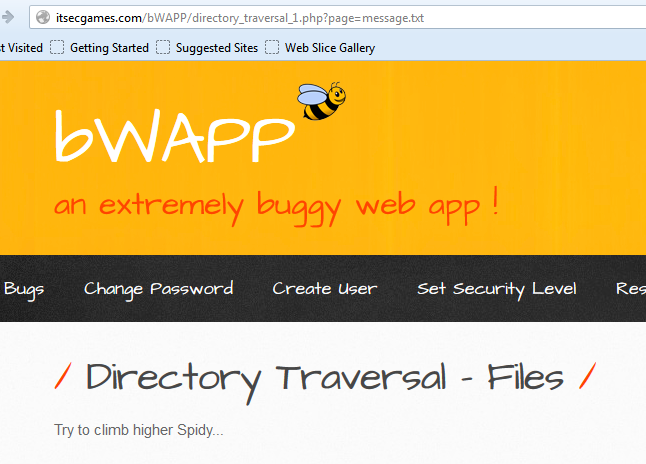
To demonstrate this attack we will use the deliberately vulnerable application  bWAPP.  If you consider the example below, the application is returning a message to the client. The file that contains the message is specified as a query string parameter e.g. message.txt.


When the server processes the request it follows these steps:
  1. Extract the value of the filename parameter from the query string
  2. Appends the value to the prefix say C:\bWAPP\
  3. Opens the file with this name
  4. Reads the file's contents and returns it to the client
Again if the attacker can place path traversal strings into the filename then they may be able to backtrack up from the directory specified in step 2 and access files anywhere on the server. The path traversal sequence is known as "dot-dot-slash".

An attacker could insert the malicious string "../../../etc/passwd" to include the password hash file of a Linux/UNIX system.


It may also be possible to return configuration files.


When trying to find path traversal vulnerabilities look for request parameters that contain the name of a file or directory e.g. include=main.inc or template=/en/sidebar. Also any application functions whose implementation is likely to retrieve data from a server filesystem such as displaying of documents or images.

Path traversal attacks have been about for some time. It is common to find applications that implement various defenses against them, often based on input validation filters. But it may be possible to bypass these filters, here are some useful tips:

Try path traversal sequences using both forward slashes and back slashes. Many input filters check for only one of these, when the filesystem may support both.

URL encoding the traversal sequences 
Dot - %2e
Forward slash - %2f
Backslash - %5c

16-bit Unicode encoding
Dot - %u002e
Forward slash - %u2215
Backslash - %u2216

Double URL encoding
Dot - %252e
Forward slash - %252f
Backslash - %255c

Here is a useful cheat sheet that you can try Link